React Basic Concepts
Before React:
- we had html, css, and js.
- Each browser had its own implementation, and each js features.
- jQuery came out and made it easy to deal with DOM manipulation.
- With websites becoming more interactive and large, js was becoming more used in websites, and backbone.js came out to organize these js files.
- With jQuery, and backbone.js and Ajax. Now we were able to only load the websites html once and only make the js change the layout or request another file.
- AngularJS was the defacto SPA in 2010.
Declarative v. Imperative:
- concept #1: react tells you, DON'T touch the DOM, i'll do it for you.
- Imperative means to directly change individual parts of the app in response to a user event.
- Imperative makes it difficult to see the relation between different events and edge cases.
- React takes a more declarative approach, it tells you to declare how the app should look like, and it manipulates the DOM for you.
- DOM manipulation is an expensive operation, because each time browsers repaint and refloat.
- React depends on State to determine how the app should behave.
Component Architecture:
- React is designed around the idea of reusable components.
- material-ui, blueprint are libraries depending the idea of reusable components.
Unidirectional Data Flow:
- React uses state, and components to create what is known as the virtual DOM.
- React then converts the virtualDOM into DOM.
- Updates to the DOM is done first to the virtual one, then these updates (batches of updates) are sent to the actual DOM.
- Changing the State, updates the virtualDOM which in turn changes the actual DOM.
- Data (state) only moves down the virtualDOM (tree) and never up. This restriction makes our lives easy when we debug and understand what is going on.
- Check this link about virtualDOM
UI Library:
-
React is just a UI library, and the rest is up to us.
-
it is not a framework like angular.
-
The core of react is the blueprint or the virtualDOM tree of components and their states. We have now react-native, react-vr, and react-electron which all depend on the blueprint react produces.
-
This explains why we import two react libraries when we are writing a react app:
react: lib responsible for generating the components treereact-dom: lib responsible for understanding what the above lib generated in the context of a virtualDOM.
React JS v. Browser:
- The version of the js used in react is far more advanced than the one used inside most of our browsers.
- For this we have babel and webpack that takes react js and convert it to what a browser could understand.
create-react-apphelps with amount of configuration needed to start react project. It simply hides babel and webpack configuration.- babel makes sure the js in our app is understood by all the browsers.
- Webpack is all about bundling the js files into one file.
Class v. Function Components:
- In class components we get access to the
stateobject. - Functional components could have state by using new hooks api. (useEffect, useState)
setState()is what is used to change a state in a react components. This ensures the unidirectional data flow in the virtualDOM, causing react to call the render function for the components affected by such a change and send these updates to the actual dom.- Remember to call
superin the component's constructor to get all the functionality of react component. setStateis Async function.
List Of JSX elements:
- Don't forget to add the
keyproperty on each JSX element that is in a list. - React uses this
keyto determine which element to change if one of these elements has a value that changes.
Lifecycle methods:
- Methods that gets called in different stages of the component's life.
- Mounting a component means, that react rendered it for the first time.
Why use components, And break ap to smaller ones??
- Remember the usability is one of the benefits we get from react.
- And using components also makes debugging and extending the app more easy.
- Because each component does only one job. We could minimize DOM updates.
Where to define the state:
- We will come to that later, but keep in mind the tree structure of the components, and changing it would re render all the children.
- Remember the second argument to
setStateis a callback that gets called after the state is updated. - React intercepts DOM events and create a synthetic event and send it to our react app.
- Also Remember, It's BAD PRACTICE to rely on state inside a
setStatecall like this:
this.setState({ counter: this.state.counter + 1 })
This has to do with the fact that React batches updates (setState calls) asynchronously, which means that if the counter is getting updated from somewhere else this could end up with unexpected behavior.
- But if we really need to depend in state or props in our updates, this is the good way to do it and make sure we are updated the intended (previous) state:
this.setState((previousState, previousProps) => {
  // return { counter: this.state.counter + 1} replace this.state with prevState
  return { counter: previousState.counter + 1}
});
this in Javascript:
- when writing custom methods in class components, pay close attention to the
thisscope inside of the methods. - We need to bind
thisfor custom methods, and it is bound to the component's class. - I prefer to leverage arrow function
thiscontext over manually binding this to custom methods. The latter is very verbose to me. - This Article is a great resource about
thisin javascript
Why JSX ?
-
In the project
pure-react, You will see the redundancy in the code by usingReact.createElementwhich is used to create html elements, pass attributes to them, and also nest another elements (the steps correspond to the three args createElement takes in). -
And it is the same for class components (in the example I used functional components.)
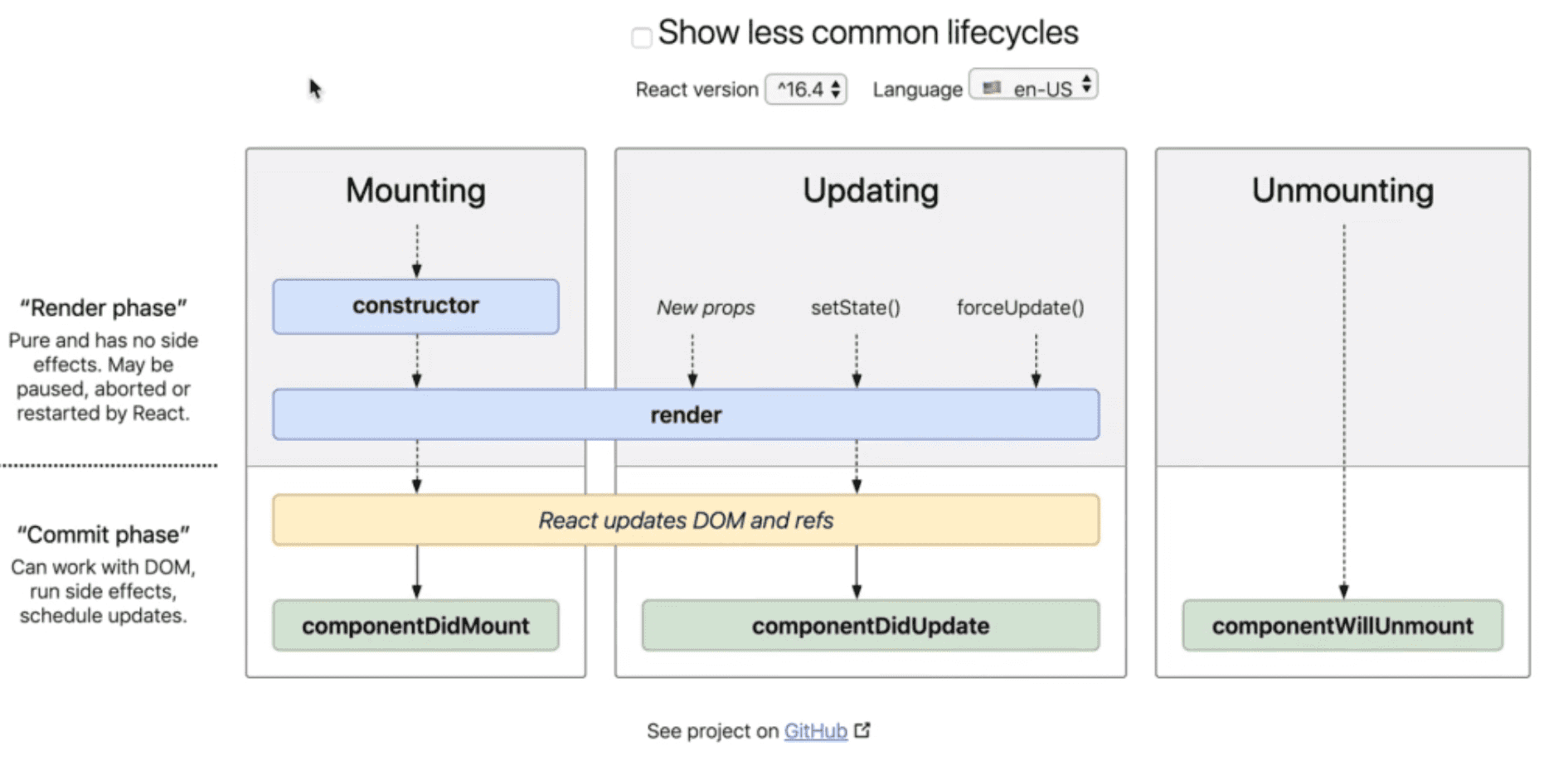
Components Lifecycle Methods:
-
The first phase is the mounting phase is when the component is being put the DOM for the first time. And is the first phase to run. And calls the constructor.
-
The second call is to component's
rendermethod. This where we specify the HTML, and also where thepropsgets evaluated. -
The third to be called is the
componentDidMount. This when react actually updates the DOM.
- the next phase is updating phase. The App could be updated if we force it to, change state, or a new props.
- render is called, decide what to change in DOM or refs.
- Call the
componentDidUpdatelifecycle method. shouldComponentUpdateis a method that gets called between reasons to update (setState, new Props, ...) and render method. It returns false/true to determine whether the app should be re-rendered or not.
-
The Last phase is the un-mounting phase. The component is striped off of or DOM.
-
componentWillUnmountgets called, and this is where we might need to cleanup and minimize the risk of memory leaks. -
The below diagram's link is at the start of this section